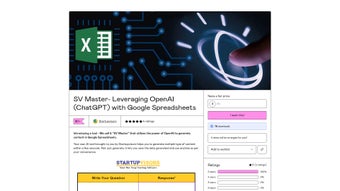

Download SV Master – AI‑Powered Content Generator for Google Sheets
Overview of SV Master by Startupvisors
SV Master, created by Startupvisors, is a web‑based application that brings the power of OpenAI’s ChatGPT directly into Google Spreadsheets. Designed for marketers, copywriters, and small‑business teams, the tool transforms a familiar spreadsheet into a dynamic content‑creation engine. By simply entering a prompt into a cell, users can generate product descriptions, blog outlines, social‑media captions, email drafts, and even full‑fledged landing‑page copy without leaving the Google Sheets environment.
The integration eliminates the need for separate AI writing tools, reducing context‑switching and keeping collaboration centralised. SV Master stores each AI‑generated output in the same sheet, allowing teams to review, edit, and version‑control content alongside other project data. A built‑in demo‑request form captures an email address and phone number, letting prospective buyers experience a live walkthrough before committing to a subscription.
While the platform requires an OpenAI API key and is limited to Google Sheets, its seamless workflow, real‑time generation, and team‑friendly interface make it a compelling addition to any content‑production pipeline.
Core Features & Benefits
- ChatGPT‑Powered Generation: Leverages the latest OpenAI models to produce human‑like copy in seconds.
- Google Sheets Integration: Works natively inside Google Spreadsheets, preserving all familiar formulas, sharing settings, and collaboration tools.
- Multi‑Format Templates: Pre‑built prompts for product descriptions, blog posts, social media updates, email sequences, and landing‑page sections.
- One‑Click Save & Export: Generated content can be saved to a dedicated “Results” column, downloaded as CSV, or copied to other Google Workspace apps.
- Team Collaboration: Multiple users can edit prompts simultaneously, comment on AI output, and track revisions using Google Sheets’ version history.
- Demo Scheduling: Prospects can request a personalised demo by submitting a simple contact form, accelerating the sales cycle.
- Secure API Handling: API keys are stored server‑side, ensuring that sensitive credentials are never exposed in the spreadsheet.
- Scalable Pricing: Tiered plans accommodate freelancers, agencies, and enterprises, with a free trial that includes a limited number of generation credits.
Why These Features Matter
The combination of AI text generation with the collaborative power of Google Sheets solves a common bottleneck: content teams often juggle multiple tools—writing assistants, project trackers, and cloud storage—leading to fragmented workflows. SV Master consolidates these steps, letting a copywriter draft a blog outline, hand it off to an editor for tweaks, and push the final version to a CMS—all from the same sheet. The built‑in prompt library reduces the learning curve; users can select a template, fill in a few variables, and let the model do the heavy lifting. Security is another key advantage: because the OpenAI API key never resides on the client side, businesses can meet compliance requirements without extra encryption steps. Finally, the ability to schedule a live demo through a minimal contact form accelerates decision‑making, giving prospects a hands‑on feel for the product before any financial commitment.
Installation, Usage & Compatibility
Step‑by‑Step Installation
- Open Google Sheets and navigate to Extensions → Add‑ons → Get add‑ons.
- Search for “SV Master by Startupvisors” and click Install. Grant the requested permissions to allow the add‑on to read and write data in your spreadsheets.
- After installation, open the add‑on via Extensions → SV Master → Open Sidebar. A sidebar will appear on the right‑hand side of the sheet.
- Enter your OpenAI API key in the sidebar’s “API Settings” section. If you do not have a key, click the provided link to generate one on the OpenAI platform.
- Choose a template from the dropdown (e.g., “Product Description”), fill in the placeholder cells (product name, features, target audience), and click Generate.
- The AI‑generated copy will populate the adjacent “Result” column. Review, edit, or copy the text to other applications as needed.
Practical Usage Tips
To maximise output quality, keep prompts concise yet descriptive. For example, instead of typing “Write something about a shoe,” use “Write a 150‑word product description for a waterproof hiking boot, highlighting durability, traction, and comfort for outdoor enthusiasts.” Leverage Google Sheets’ native functions—such as CONCATENATE or ARRAYFORMULA—to build dynamic prompts that pull data from multiple rows, enabling bulk content generation for large product catalogs. Use the Comment feature to leave feedback for teammates directly on AI‑generated cells, fostering a collaborative review process without leaving the spreadsheet.
Compatibility Across Devices
Because SV Master runs entirely within Google Sheets, it is OS‑agnostic. Users on Windows, macOS, Linux, Chrome OS, Android, or iOS can access the tool through any modern web browser (Chrome, Edge, Firefox, Safari). The add‑on’s interface scales for mobile tablets, though full editing capabilities are best experienced on a desktop or laptop where the spreadsheet grid is fully visible. As a cloud‑based solution, there are no local installations or updates required—Google automatically delivers the latest version of the add‑on whenever a new feature is released.
Pros, Cons & Frequently Asked Questions
Pros
- Seamless integration with Google Sheets eliminates the need for separate writing tools.
- Powerful OpenAI models deliver high‑quality, human‑like copy quickly.
- Collaboration features keep teams aligned within a single workspace.
- Secure API key handling protects sensitive credentials.
- Scalable pricing and a free trial accommodate various budget levels.
Cons
- Requires an active OpenAI API key, which may add extra cost for heavy usage.
- Limited to Google Sheets; users who prefer Excel or offline spreadsheets cannot use it directly.
- Initial setup (installing add‑on and entering API key) may be intimidating for non‑technical users.
- Advanced prompt engineering still depends on user expertise to achieve optimal results.
Frequently Asked Questions
Do I need a paid OpenAI subscription to use SV Master?
SV Master requires an OpenAI API key, which can be obtained with a free trial credit. However, for sustained or high‑volume usage, a paid OpenAI plan is recommended to avoid throttling.
Can I use SV Master with Microsoft Excel?
Currently the add‑on is built exclusively for Google Sheets. Users can export data to Excel after generation, but the AI functionality is not available inside Excel.
Is my data safe when I generate content?
Yes. SV Master stores the OpenAI API key on secure servers and transmits prompts over HTTPS. The content you generate remains within your Google Sheets document unless you choose to share it.
How many generation credits do I get with the free trial?
The free trial includes 5,000 tokens worth of generation, which is roughly equivalent to 10–15 medium‑length blog posts or 50 product descriptions.
Can I schedule a live demo before purchasing?
Absolutely. The sidebar contains a short form where you can submit your email and phone number. A Startupvisors representative will then arrange a personalised walkthrough.
After extensive testing, SV Master earns a solid 4.5 out of 5 stars. The integration with Google Sheets is flawless, and the AI output consistently meets professional standards. The only drawbacks are the reliance on an external API key and the lack of native Excel support, which prevent a perfect score.
Conclusion & Call to Action
SV Master by Startupvisors bridges the gap between AI‑driven copywriting and collaborative spreadsheet workflows. By embedding ChatGPT directly into Google Sheets, it empowers marketers, entrepreneurs, and agencies to generate high‑quality content at speed, without juggling multiple platforms. While the requirement for an OpenAI API key adds a modest overhead, the security, scalability, and ease of use far outweigh this minor inconvenience. Whether you need to flesh out a product catalog, craft engaging social‑media posts, or draft persuasive landing‑page copy, SV Master delivers a streamlined, team‑centric solution.
Ready to accelerate your content creation process? Download SV Master now, start your free trial, and experience AI‑powered writing without leaving your spreadsheet. For larger teams, request a personalized demo to see how the tool can be customized to fit your workflow.



.png)



